OBS noise gate settings, and the four-filter chain around them
Set the OBS noise gate with two sliders:
- Close Threshold just above your room's noise on the meter;
- Open Threshold a few dB under your quietest voice.
OBS ships -32 dB close and -26 dB open as defaults, and they're a fair starting point for many headsets.
Then build the rest of the mic chain in this order: Noise Suppression, Noise Gate, Compressor, Limiter. OBS's own knowledge base fixes one end of that firmly: the limiter "should be the last filter in your chain". The rest is reasoning, and this page shows it, so you can change the order on purpose rather than by accident.
This is for anyone streaming or recording a mic in OBS 32 or later who hears keyboard bleed between sentences, or watches the meter jump into the red when they shout. If your problem is constant fan hum under your voice, start at OBS noise suppression. A gate can't touch noise that plays while you talk.
Add it, chip by chip
Repeat the same path for Noise Suppression, Compressor and Limiter. Filters run top to bottom in the list, and you drag them to reorder. They belong to the audio source, not to the scene. If you add your mic to a second scene as a fresh source rather than a reference, it starts with an empty chain.
The chain, top to bottom (and why)
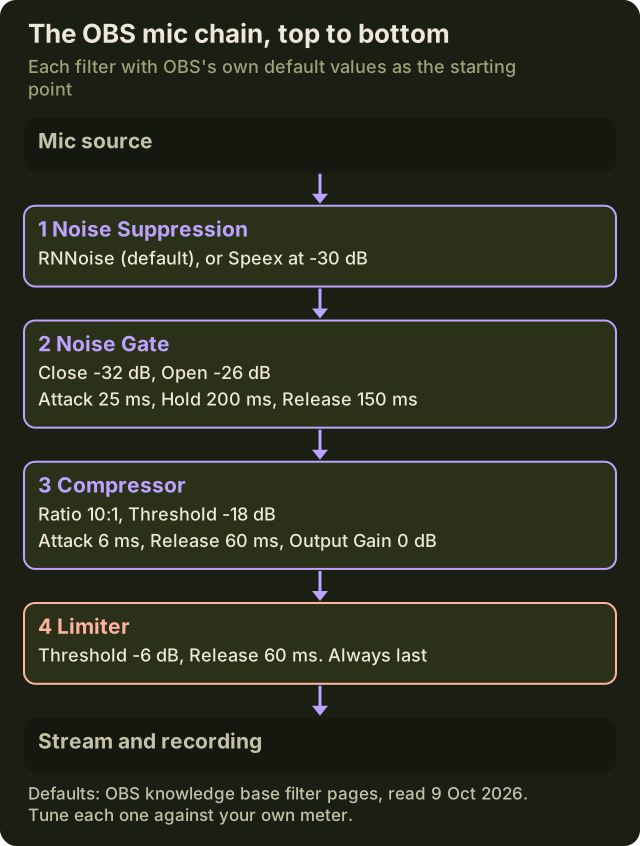
| # | Filter | Its job | OBS default | If it sits in the wrong slot |
|---|---|---|---|---|
| 1 | Noise Suppression | Lowers steady noise: fans, hum, room tone | Method RNNoise; Speex level -30 dB | After the compressor, it's cleaning noise the compressor already lifted |
| 2 | Noise Gate | Mutes the mic between sentences | Close -32 dB, Open -26 dB, Attack 25 ms, Hold 200 ms, Release 150 ms | After the compressor, the thresholds move every time you touch the compressor |
| 3 | Compressor | Makes loud moments quieter | 10:1, -18 dB, Attack 6 ms, Release 60 ms, Output Gain 0 dB | Before the gate, its output gain raises the floor the gate is judging |
| 4 | Limiter | A hard ceiling so peaks can't clip | Threshold -6 dB, Release 60 ms | Anywhere but last, a later filter can push past the ceiling |
Why suppression first. RNNoise lowers the room before the gate ever sees it. That widens the gap between your floor and your voice, which is the whole thing a gate needs.
Why the gate before the compressor. OBS's compressor page says it "typically would be placed at or near the beginning of your filter chain". We put it third, behind the two clean-up filters, and here's why. A compressor with output gain lifts quiet sound, room noise included. Gate first, and your thresholds are set on a signal no other knob changes.
Why the limiter last. OBS is explicit. A limiter is "a special type of compressor with a very fast attack and a very high ratio" that stops the signal peaking above 0 dB, and it "should be the last filter in your chain". Anything placed after it can undo the ceiling.
The two-slider method
OBS's own advice for the gate fits in one line: a close threshold above the noise, and an open threshold slightly below your voice. The method is how you find those two numbers on your rig.
- Find your floor. Sit silent with your hands on the keyboard and the fan running, and watch the mic meter in the OBS audio mixer. With suppression already above the gate, read the meter after it's applied. Say the room rests at -45 dB.
- Set Close just above the floor. With a -45 dB floor, try Close around -40 dB. The gate now shuts on room noise alone.
- Set Open just below your quiet voice. Talk at your real muttering-at-teammates volume and note the meter. Put Open a few dB under it. The defaults, -26 dB open and -32 dB close, fit a lot of headsets; your meter beats the defaults.
- Test like you play. Type hard while silent: the gate should stay shut. Speak mid-clatter: it should open at once. Adjust in 2 dB steps, one slider at a time.
- -45 dBthe worked example’s room floor — silent, hands on the keyboard, fan on
- -40 dBclose threshold, set just above that floor
- -32 dBthe OBS default close
- -26 dBthe OBS default open — move both in 2 dB steps from here
Four marks, four numbers, all four of them from the method and the FAQ on this page; the scale runs -50 to -20 dB so the gap between floor and voice is the thing you see. Your own meter replaces every mark on it.
The gap between the two thresholds is deliberate. Open has to sit above Close, so a voice that dips briefly between words doesn't slam the gate shut and chatter.
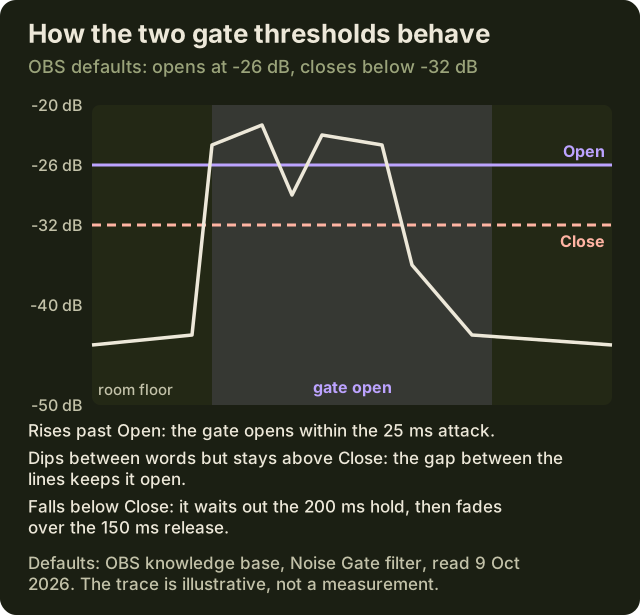
The three timing controls, in plain terms:
- Attack (25 ms default): how fast the gate opens once you cross Open. If first syllables vanish, lower Open before you touch attack.
- Hold (200 ms default): how long it stays open after you drop below Close. Raise it a little if the gate chatters between words.
- Release (150 ms default): how long the fade to silence takes. Too short sounds clipped; too long lets the keyboard tail through.
Compressor and limiter starting points
OBS describes the compressor in one sentence: it "makes loud sounds quieter". It's the fix for the clutch-moment shout that spikes the meter while your normal speech sits fine.
- Ratio: OBS's default is 10:1, which is strong. OBS's own example gives the scale. At 2:1, audio 6 dB over the threshold comes out 3 dB over: weak compression. 6:1 is "much stronger". If 10:1 makes you sound squashed, step down toward the middle of that range.
- Threshold: -18 dB by default. Shout a callout, watch the compressor's gain reduction, and lower the threshold until your loudest moments get caught but normal speech mostly doesn't.
- Attack and release: 6 ms and 60 ms by default. Leave them there until everything else is done.
- Output gain: 0 dB by default. Compression lowers your average level, and OBS notes that output gain brings it back up. Add it in small steps, and remember that it lifts your floor too, which is why the gate sits above this filter.
Limiter: -6 dB threshold and 60 ms release by default, last in the chain. It's the safety net, not a tone control. If it's working constantly, the compressor above it isn't doing its job.
A bonus streamers miss: ducking. Put a second compressor on your Desktop Audio source and set its Sidechain/Ducking Source to your mic. Your game audio then dips whenever you talk. OBS's suggested starting values are:
- ratio 32:1;
- threshold -36 dB;
- attack 100 ms;
- release 600 ms;
- output gain 0 dB.
Where suppression sits, and the CPU budget
The Noise Suppression filter has three methods. OBS's notes:
- RNNoise (the default) is the higher-quality method, and OBS warns that it costs more CPU than Speex.
- Speex is configurable. Its level defaults to -30 dB, and stronger settings "can distort other sounds (like your voice)".
- NVIDIA Noise Removal appears only after you install NVIDIA's Broadcast SDK redistributable. NVIDIA lists a GeForce RTX 2060 or better, Windows 10 64-bit and a 570+ driver for it.
OBS is also candid about the filter's limits. It's "generally not effective at large amounts of background noise", but good at things like PC fan noise.
Every one of those methods spends something: CPU for RNNoise and Speex, GPU for NVIDIA's. Measure what your rig pays, rather than trusting a number from someone else's. Run the same five minutes of your game with the filter off and then on, and compare the 1% lows. The free stack page has the full 60-second protocol. If your GPU is already the bottleneck, a GPU filter is the wrong pick, and if your CPU is pinned by an x264 encode, RNNoise is.
There's one more alternative to a gate. OBS's Expander "can be used in place of a gate". It turns quiet sound down by a ratio instead of muting it, which gives a smoother open and close. OBS places it near the end of the chain, after compression and before the limiter. Use one or the other, not both.
If you'd rather run one suppressor for every app instead of a separate chain in each, a virtual mic upstream does that. Krisp's desktop app installs Krisp Microphone; select it as the OBS mic source and keep the gate, compressor and limiter below it. Don't stack OBS suppression on top of it. Krisp has no ongoing no-cost tier. Once the 7-day trial ends, keeping it means Core at $8 per month on annual billing, or $16 if you pay monthly (pricing checked 9 October 2026).
Gate before or after suppression?
This is the one ordering argument with two defensible answers.
- Gate after suppression (our default): the gate judges a cleaner signal with a lower floor, so there's more room between Close and Open.
- Gate before suppression: the gate judges the raw mic, and suppression only runs while you're talking.
Either works, as long as you set the thresholds after the filters above the gate are in place, and re-check them whenever you change one. A threshold copied from a chain in another order is a guess.
Testing with a recording
Your own ears lie while you're talking. Record instead:
- In OBS, record two minutes with only your mic and the full chain on.
- Cover four moments: silent typing; a soft callout mid-typing; a shout; a laugh.
- Play it back on headphones. Listen for keyboard between sentences (the gate), clipped first words (Open or attack), pumping after a shout (the compressor's release or ratio), and any harsh peaks (the limiter isn't last, or the compressor is too light).
- Change one control, re-record, and compare. Two changes at once tell you nothing.
When a gate is the wrong tool
- Constant noise under your voice: fan or hum passes straight through an open gate. That's suppression's job, or a better mic position.
- Quiet talkers on a co-stream: soft voices fight any gate. Fix distance and input gain first, then lower Open.
- Discord chat: this gate shapes only what OBS outputs. Your voice chat has its own threshold, input sensitivity. Set it on Discord's side.
Lobby questions
- What are good OBS noise gate settings?
- Start at OBS's defaults: Close -32 dB, Open -26 dB, Attack 25 ms, Hold 200 ms, Release 150 ms. Then set Close just above your room's noise on the meter, and Open a few dB below your quietest speech. Test while typing and adjust in 2 dB steps. Numbers copied from another streamer's mic rarely transfer.
- What order should OBS audio filters go in?
- Noise Suppression, Noise Gate, Compressor, Limiter. Suppression lowers the floor, the gate mutes the gaps, the compressor tames loud moments, and the limiter caps the peaks. OBS's own docs fix only the end: the limiter goes last. If you use an Expander instead of a gate, OBS places it after compression and before the limiter.
- Should the noise gate go before or after noise suppression?
- Either can work. After suppression, the gate sees a lower floor and is easier to set; before it, the gate judges the raw mic. What matters is setting the thresholds once the filters above the gate are in place, and re-checking them whenever you change the order.
- What are good OBS compressor settings for a mic?
- OBS's defaults are a 10:1 ratio, -18 dB threshold, 6 ms attack, 60 ms release and 0 dB output gain. 10:1 is strong. OBS calls 2:1 weak and 6:1 much stronger, so step down if you sound squashed. Lower the threshold until shouts get caught but normal speech doesn't, then add output gain in small steps.
- Why does my OBS noise gate cut off the start of my words?
- Your Open threshold is above your quietest syllables, so soft first sounds never open the gate. Lower Open a few dB and test again. If it still clips, shorten the attack. A gate placed after a compressor can also shift where your voice lands, so check the filter order too.