Discord noise suppression: turn on Krisp, then fix it when it quits
Discord noise suppression is the Krisp toggle under User Settings → Voice & Video → Noise Suppression. Inside Discord it costs nothing. When it's missing, greyed out or switching itself off, the cause is nearly always one of four things:
- your Mac has an Intel chip or runs a macOS older than 12;
- you're in a browser other than desktop Chrome or Firefox;
- your CPU is so busy that Discord turns Krisp off on purpose;
- a second suppressor upstream is fighting it.
Run the fix order below from the top, and stop at the first step that changes what your squad hears.
This page is for anyone on Discord voice whose squad can hear the keyboard, the fan or the dog. Skip it if nobody hears you at all. That's a dead input, not a noisy one, and the Discord mic not working triage starts there.
How to turn on noise suppression in Discord
Discord's Krisp FAQ gives two routes on each platform. Both end at the same switch.
Desktop app and browser
- Mid-call: while connected to a voice channel, click the Noise Suppression icon in the voice panel and toggle Krisp.
- From settings: User Settings → Voice & Video → scroll to Noise Suppression → select Krisp.
Phone (Android and iOS)
- Mid-call: while connected, tap the channel name in the top-left corner, scroll to Noise Suppression and tap Krisp. Swipe down to close.
- From settings: avatar (bottom right) → cog (top right) → App Settings → Voice → Noise Suppression → Krisp.
Three things Discord's FAQ confirms, and players keep getting wrong:
- It sticks. Once it's on, it stays on for every new voice chat until you switch it off. You don't re-enable it per server.
- It only cleans your side. It filters what you send. Your teammate's vacuum is your teammate's toggle, so send them this page.
- It runs on your machine. Discord says the model runs on-device and no voice or user data is sent to Krisp.
Discord also says Krisp works on video calls and in the voice channel during a Go Live stream.
| Where you use Discord | Krisp available? | The catch |
|---|---|---|
| Windows desktop app | Yes | Discord turns it off under very high CPU load |
| Linux desktop app | Yes | Same CPU rule |
| Mac desktop app | Apple silicon only | Needs macOS 12 or later; Intel Macs are unsupported |
| Browser | Desktop Chrome and Firefox | Available in those two since 30 October 2023; other browsers unsupported |
| Android and iOS apps | Yes | Toggle lives under App Settings → Voice |
| Price inside Discord | $0 | Using Krisp in other apps needs Krisp's own paid app |
Source: Discord Krisp FAQ.
Krisp vs Standard: which to pick
Discord's help center names only one suppression option: Krisp. Many clients show a second, non-Krisp choice next to it, which players call Standard. Discord doesn't document that choice in its help articles, so we won't pretend to know its exact label or internals in your build.
What Discord does document, in the developer docs for its Social SDK (the voice engine it offers to game studios), is the same split. There's a WebRTC-based suppressor that "suppresses steady background noise (e.g. fans, keyboards, room tone)". Krisp, it says, "removes a much wider range of background sounds than the WebRTC suppression". The two are mutually exclusive. It's a reasonable read that the app's non-Krisp option is that WebRTC suppressor, but that's our inference, not Discord's statement.
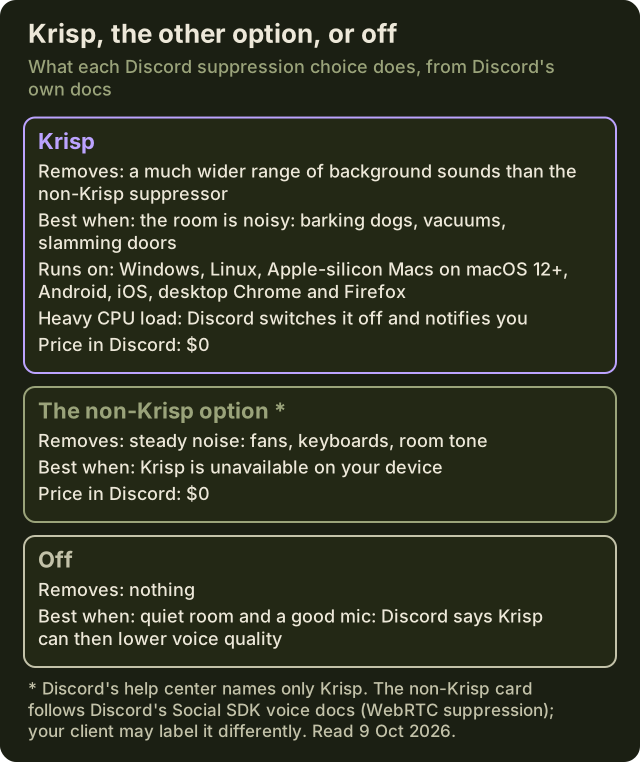
How to pick:
- Noisy room, or a headset mic that picks up everything: Krisp. That's the job Discord's FAQ says it's best at, with non-voice noise like barking dogs, vacuums and slamming doors.
- Quiet room and a good mic: try it off. Discord's own FAQ warns that in a quiet room with a high-quality mic you may notice a decline in voice quality, and it encourages leaving Krisp off there.
- Steady hum only, or Krisp isn't available on your device: the non-Krisp option, if your client offers it.
- Already running NVIDIA Broadcast, Sonar or the Krisp app upstream: off. See the one-suppressor rule below.
The search for "Krisp or Standard" usually comes from someone whose voice sounds processed. If that's you, the answer is often neither. Switch suppression off for a call and ask your squad whether anything got worse.
Krisp missing or greyed out: the causes
If Krisp isn't in the list, or won't select, it's almost always the platform, not a bug.
- An Intel Mac. Discord's FAQ is blunt: Mac support needs an Apple CPU on macOS 12 or later. Check Apple menu → About This Mac. If the Chip line says Intel, Krisp in Discord isn't coming back, whatever you reinstall.
- The wrong browser. Browser support is desktop Chrome and Firefox only, since 30 October 2023. Safari and other browsers aren't on Discord's list. Either switch browser or use the desktop app.
- An outdated client. Discord's troubleshooting guide puts updates among its first steps. Press Ctrl+R (Cmd+R on Mac) to refresh the client, or quit it fully and relaunch.
- An input profile that hides the switch. Newer clients put an Input Profile choice above the voice-processing settings. Focusrite's Discord setup guide lists three profiles, Voice Isolation, Studio and Custom, and says Custom is where you change single settings such as noise suppression and echo cancellation. Discord's patch notes of 4 November 2025 fixed a bug that stopped Krisp working whenever the profile was anything other than Custom. If the Noise Suppression controls look locked, or Krisp seems to do nothing, update the client, set the profile to Custom and select Krisp there.
- A console. Discord's Krisp platform list is Windows, Linux, Mac, Android and iOS. Consoles aren't on it.
- Audio Subsystem changes on Windows. Discord's guide suggests switching Audio Subsystem from Standard to Legacy, or back, when voice misbehaves (Voice & Video → scroll to Audio Subsystem). Discord doesn't document which voice features each subsystem supports. If Krisp went missing right after you changed it, change it back. Treat the switch as a test, not a fix.
Krisp on but not working in Discord: the fix order
Krisp is on, and your squad still hears noise, or it keeps flipping itself off. Work down this list. Every step is either from Discord's help center or a check on the layers around it.
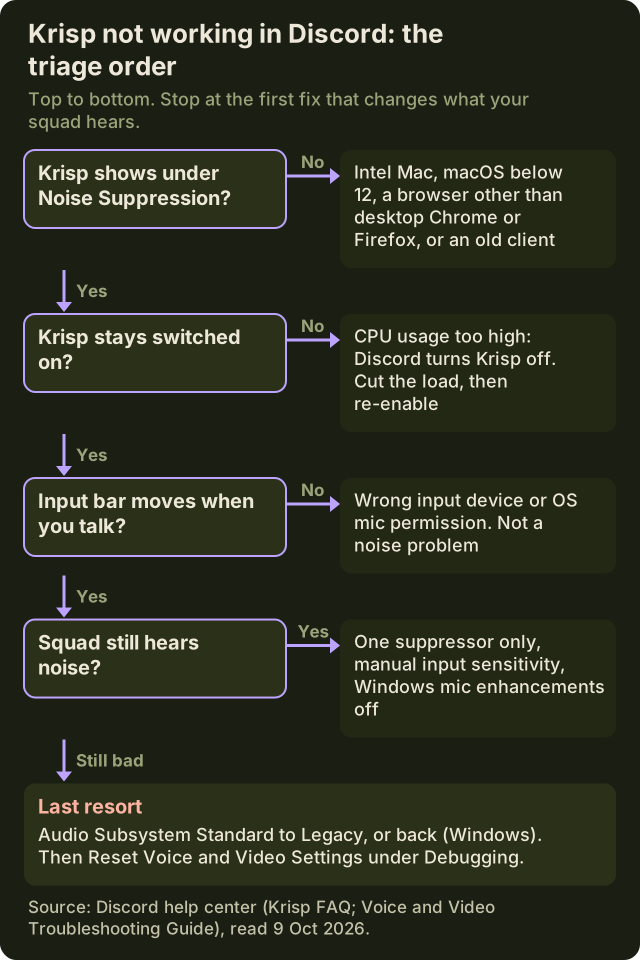
- Prove you're transmitting. Voice & Video → Input Device: pick your mic by name, not Default. Then hit the Mic Test's Let's Check button. If the bar doesn't move, this isn't a suppression problem. Go to mic triage.
- Check it's actually on. Look at the Noise Suppression icon in the voice panel. A setting changed in the browser client doesn't prove the desktop app has it, so check the client you actually play in.
- If it keeps switching off, it's your CPU. Discord's FAQ says Krisp turns off automatically when CPU usage is very high, and notifies you. It will keep doing that until you lower the load. Usual suspects: an OBS x264 encode, a browser full of tabs, a game that pins every core. Check Task Manager before blaming Discord.
- Set input sensitivity by hand. Krisp cleans noise while you talk. Input sensitivity decides when you transmit at all. Discord recommends disabling Automatically determine input sensitivity if the ends of your sentences get cut off. Put the marker between your softest voice and your loudest keyboard. Input sensitivity is Discord's noise gate, and the Discord noise gate guide sets it from the meter.
- Run one suppressor. If NVIDIA Broadcast, SteelSeries Sonar or the Krisp app is already your input device, switch Discord's suppression off. More below.
- Turn off Windows mic enhancements. Discord's PC-only steps say to open Sound Control Panel → Recording → your mic → Properties and disable the optional microphone enhancements.
- Swap the Audio Subsystem (Windows). Standard to Legacy, or back, then test again.
- Reset, as a last resort. Voice & Video → Debugging → Reset Voice and Video Settings. You'll redo your device picks and sensitivity afterwards.
- Still broken? Write to Discord. Contact Discord support with your OS version, screenshots of Voice & Video, and the debug log from the Debugging tab.
If the issue is a voice that sounds robotic, quiet or choppy rather than noisy, suspect echo cancellation and automatic gain control as much as suppression. Change one switch per test.
One suppressor per path
Every noise tool on a gaming PC works one of two ways. Either it sits inside an app, like Discord's toggle or the OBS filter, or it creates a virtual microphone that every app can pick. Stack a virtual mic with Discord's own suppression and two models guess at the same signal. The usual result is a thin, watery voice that sounds worse than either tool alone. Pick one engine per signal path and set the others to off.
- Discord's toggle: $0, runs on your device. Discord only.
- NVIDIA Broadcast: free. Needs a GeForce RTX 2060 or better, 8 GB of RAM, Windows 10 64-bit and an R570 or newer driver. Runs on the GPU, the same card your game is using. See NVIDIA Broadcast setup.
- SteelSeries Sonar: free inside SteelSeries GG, Windows only, and its AI noise cancellation runs on the CPU. See Sonar setup.
- Krisp desktop app: a virtual mic called Krisp Microphone, desktop only (64-bit Windows 10 or 11, macOS 14 or later). Krisp lets you try it for 7 days without a card; to keep it, Core runs $8 per month on a yearly plan or $16 paid monthly (Krisp's pricing page, 9 October 2026).
Measure the cost on your own rig with the 60-second frame check on the free stack page. Any FPS number from someone else's PC is a rumour.
What the toggle can't do
Discord's Krisp lives inside Discord. Your OBS stream, a Zoom call and in-game voice chat all hear your raw mic. For the stream side, the OBS noise suppression filter is the $0 answer.
It also can't clean what comes in. Your teammate's vacuum stays loud until they flip their own switch. The standalone Krisp app is different there: it installs a Krisp Speaker device as well as Krisp Microphone, so it can clean incoming audio too. That's the honest case for paying. If both problems are inside Discord, the free toggle on both ends beats any subscription.
Edge cases
- Go Live: Discord says Krisp works in the voice channel while you stream with Go Live. Your stream's game audio isn't what it filters.
- Quiet streamer room, good mic: this is the one setup where Discord itself suggests leaving Krisp off. Test both ways and keep whichever your squad prefers.
- Laptop on battery: a throttled CPU can hit the very-high-usage line sooner, so Krisp may switch off more often unplugged.
- Two devices in one call: desktop plus phone in the same channel can make you sound doubled or echoey. That's not suppression failing. Leave the call on one device.
- Modded clients: skip them. Patched builds promising better audio are a risk to your account, and nobody supports them when voice breaks.
Lobby questions
- How do I turn on noise suppression on Discord?
- On desktop or in the browser, open User Settings → Voice & Video, scroll to Noise Suppression and select Krisp. You can also click the Noise Suppression icon in the voice panel during a call. On the phone app it's App Settings → Voice → Noise Suppression, or tap the channel name mid-call. It stays on for future calls.
- How do I turn off noise suppression on Discord?
- Use the same switch. Mid-call, click the Noise Suppression icon in the voice panel and toggle Krisp off. Or open User Settings → Voice & Video and set Noise Suppression to None, the step SteelSeries' own Discord guide gives Sonar users. On the phone app, switch Krisp off under App Settings → Voice → Noise Suppression. If the switch is out of reach, set the input profile to Custom first.
- Why is Discord Krisp not working?
- First check that your device is supported. Krisp in Discord needs Windows, Linux, an Apple-silicon Mac on macOS 12+, Android, iOS, or desktop Chrome or Firefox. If it keeps turning off, Discord is switching it off because CPU usage is very high. If it's on and people still hear noise, check the input device, run one suppressor only, and set input sensitivity by hand. On newer clients, also check that the input profile is set to Custom.
- Is Discord's noise suppression powered by Krisp?
- Yes. Discord's help center describes Krisp as a third-party, machine-learning noise filter integrated into Discord. It runs on your device, and Discord says no voice or user data is sent to Krisp. Using it inside Discord costs nothing; using Krisp in other apps means Krisp's own app, which is paid after a 7-day trial.
- Krisp or Standard noise suppression on Discord: which is better?
- In a noisy room, Krisp. Discord's developer docs say it removes a much wider range of background sounds than the WebRTC-style suppressor. In a quiet room with a good mic, Discord itself suggests leaving Krisp off, because it can reduce voice quality there. The non-Krisp option is for steady hum, or for devices where Krisp isn't available.
- Why does Krisp keep turning off on Discord?
- Because Discord turns it off when your CPU usage gets very high, to protect voice performance, and it shows you a notice when it does. Lower the load before you re-enable it, by closing heavy background apps or easing your encoder settings, or it will keep switching off.
- Does Discord noise suppression work on PS5?
- Not as a Discord toggle. Discord's Krisp FAQ lists Windows, Linux, Mac, Android and iOS, and consoles aren't on it. On a PS5, any cleanup has to come from your headset or the console's own mic settings, not from Discord.